
Name-Based Case Searches
re:SearchTX is the first statewide tool worth trying for an eligible Red River County case. Its quick reference walks through name searches for parties, attorneys, and judges. Choose Search Cases for the file. Use Hearings for a setting. Wildcards work for names, though the live portal may expose controls that depend on your access role. Treat a name match as a lead only. Weigh the court and the case type too. Check the filing date and other details. Only then trust that a result is the right matter.
Begin narrow, then loosen the query. A middle name, former name, spelling variation, or business suffix can shift the results. An access error in one browser proves little. It does not mean the portal is closed to ordinary users. Keep the clerk route ready when a screen will not load or no result appears.
- Open re:SearchTX and select an available Search By option.
- Choose Cases or Hearings for the task at hand.
- Enter the best known name and narrow by court, type, or date if offered.
- Compare details, then record the case number and court.
- Verify status, setting, or copy access with the local custodian.
| Field or control | Type | Required | Use |
|---|---|---|---|
| Search By | Dropdown | Yes | Selects the search path. |
| Cases / Hearings | Mode | Yes | Separates case and hearing discovery. |
| Party, attorney, or judge | Name | Varies | The guide describes wildcard support. |
| Advanced Search | Controls | No | Adds filters to a broad query. |
Red River County Search Fallbacks
Beyond the statewide system and the county clerk pages, Red River County offers no official case-search page, so the fallback depends on jurisdiction. The Red River County District Clerk keeps district-court records. The County Clerk handles the constitutional County Court, misdemeanors, and probate within its stated scope. The countywide Justice of the Peace retains its cases. The issuing municipal court holds city matters.
When you call, have the party name, court, approximate filing date, and any cause number ready. The District Clerk sits at 903-427-3761, the County Clerk at 903-427-2401, and the Justice of the Peace at 903-427-3322. In-person visits matter too. The County Clerk states it need not conduct general searches. It directs people to search records at the office when they are not online.
Case Number Searches
A cause number is the best key for a Red River County docket search. Copy it exactly. Pull it from a citation, pleading, notice, or prior receipt. There is no single verified local pattern. Never force a number into an invented format. Treat the known cause number as a literal identifier and pair it with the named court. The same digits may not route correctly at the wrong level.
If re:SearchTX accepts the number, check the case description and court before opening details. If re:SearchTX rejects the number, stop there. Hand the identifier to the proper clerk. County Clerk copy forms ask for a Cause #, defendant or deceased person, and document type. That form shows why a number alone may not yield a precise record request.
Red River County Search Lanes
Texas trial courts overlap by subject and amount, so one office may hold a record another lacks. Red River County is served by the Sixth and 102nd District Courts for broad civil, family, and felony work. The constitutional County Court keeps a separate docket. Justice and municipal courts handle their own lower-court matters.
| Case lane | Starting custodian | Typical need |
|---|---|---|
| District Court | District Clerk | Felony, divorce, family, land-title, or district civil case |
| County Court | County Clerk | Misdemeanor, probate, or county record |
| Justice Court | Justice of the Peace | Small claim, eviction, or fine-only matter |
| Municipal Court | Issuing city court | City ordinance or municipal citation |
The County Clerk expressly excludes traffic tickets, felony cases, divorces, and child-support cases. That boundary keeps a request from landing at an office that has said it does not keep that case type.
Case Search Results Explained
A re:SearchTX result may lead to a case description, number and type, parties, attorneys, judicial officers, filings, hearings, and docket or register activity. Availability shifts with the case, court, local integration, and user role. Some documents may require a separate cart purchase. Exporting, sharing, saving, or setting an alert is easy. None of it turns a result into a certified record.
| Case number | The identifier used to route the matter. |
|---|---|
| Case description and type | The subject and category assigned by the court. |
| Parties and counsel | Names shown when public access permits. |
| Filings and docket | Activity entries and available papers, which may be incomplete online. |
| Hearings | Setting details that still need current confirmation. |
A docket entry is not always the filed paper. An online document is not always certified. When the distinction matters, ask the clerk for the exact product you need.
Red River County Portal Boundaries
The County Records Online screen is easy to mistake for a court search. It offers a Search Term box, date presets, and index-only or full-text OCR searching. But it is the County Clerk's public-record and deed index. It is not a civil, criminal, probate, or traffic docket.
Deeds, liens, and similar instruments may relate to a dispute. The index will not supply the judicial filing history. For a lawsuit, use re:SearchTX and the court clerk. For an official instrument, use County Records Online. Keeping the two products apart cuts down false matches. A recorded instrument can even name the same parties as a lawsuit. It is still a different record. It is kept for a different purpose.
Two Ways to Search: County and State
Red River County gives you statewide electronic search plus clerk-mediated local access, not two equal portals. re:SearchTX helps with discovery across participating court data. The local clerk remains the source for the original court file, current setting confirmation, and copies or certification.
| Point | re:SearchTX | Local custodian |
|---|---|---|
| Coverage | Eligible statewide case and hearing data | Records kept by that local court |
| Best use | Discover a case, number, filing, or hearing | Confirm status and request an official copy |
| Limits | Role, integration, confidentiality, document limits | Needs the correct clerk and identifying detail |
The official quick reference explains the search tools. When coverage is unclear, calling the local clerk is the practical second step.
Red River County Hearing Searches
Hunting a court date? Run the case search and the hearing search separately. The state guide treats them as two different modes. A case detail page can list hearings on its own. A hearing query sometimes gets you there faster. The Red River County District Clerk also posts selected dates under separate headings for the Sixth and 102nd District Courts.
Treat those postings as snapshots rather than a full archive. The May 2026 dates on the site are historical, and a setting can always move. Before you go, confirm the date, time, courtroom, and assigned court. Check with the clerk or the coordinator. That last step matters. District judge pages list offices outside Clarksville, while a Red River County docket may sit at the county courthouse.
Red River County Filing Status
eFileTexas handles filings, not public case searches. The clerk can accept a submitted envelope or return it. Save the accepted timestamp, but acceptance does not mean the filing shows up right away in a Red River County docket search.
Which Cases Stay Restricted
A blank Red River County search does not mean no case exists. Spelling errors can hide a match. So can a filing in another court, delayed integration, or older data. A lawful restriction can do the same. Juvenile matters, sealed files, and nondisclosure or expunction records may all get limited access. Protected identifiers, confidential family information, and court-ordered restrictions can too.
Texas Rule of Judicial Administration 12 sets the general framework for judicial-record access. Other law may still control a given file. Rule of Civil Procedure 76a governs civil sealing. Courts are not treated as ordinary executive agencies under the Texas Public Information Act. Ask the clerk which court rule or request process applies to the file you need.
Red River County Directory Conflicts
Older statewide court directories sometimes list district judge or coordinator names that no longer match the current Red River County court pages. Rely on the live Sixth and 102nd District Court pages for present contact routing. Confirm the assigned court directly instead of blending old and new listings.
Red River County Search Verification
Before acting on any result, compare the cause number, court, parties, and event date against a notice you already hold. Then ask the clerk whether the status is current. That check matters for hearing dates, dispositions, and copies. A saved search or alert can track activity, but it is not court certification.
Best evidence: Use online search to locate the matter, then verify a key date, disposition, or filing with the court that maintains the original Red River County record.
Name the exact document when you request one from the clerk. An order, judgment, docket sheet, petition, or certified disposition works. Broad requests are harder to route, and the County Clerk disclaims any duty to run most searches for you.
Red River County Search Evidence
The official statewide portal is the source for the search interface shown below.
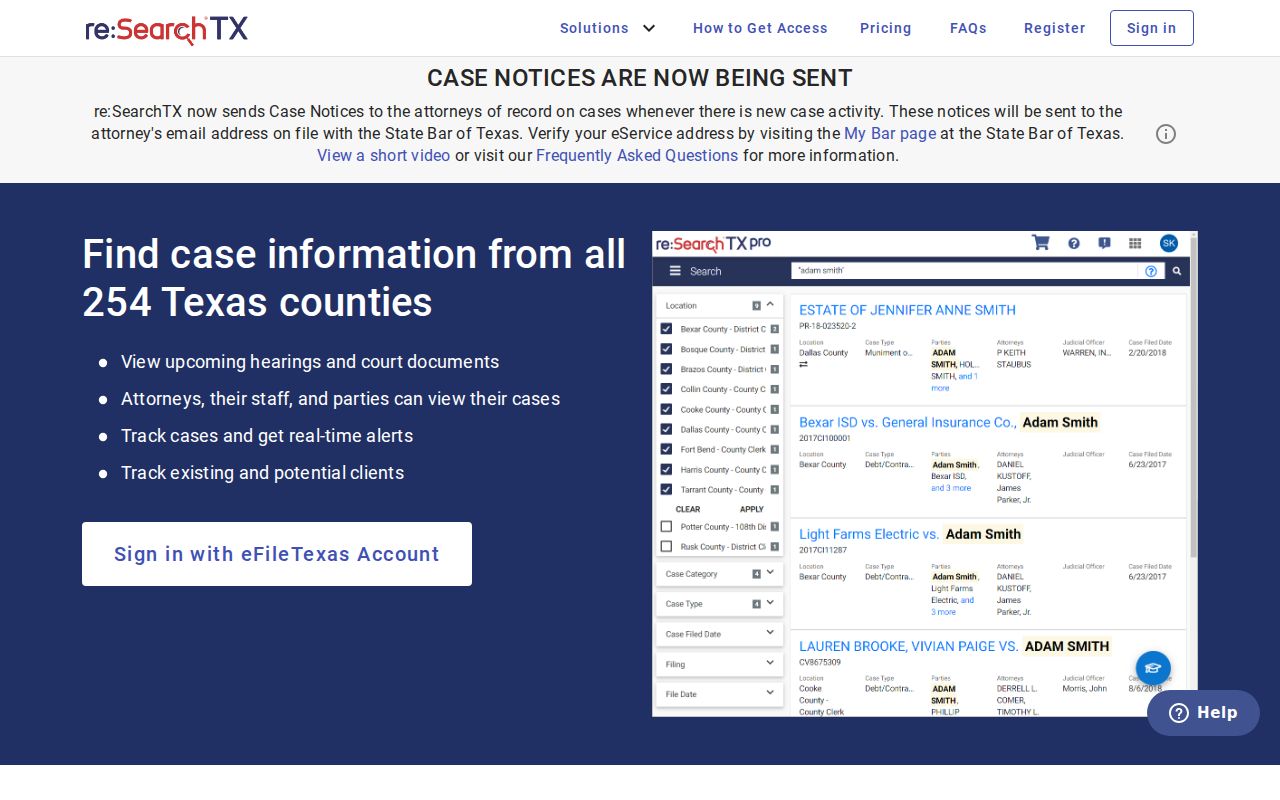
The page here helps with re:SearchTX. Check its current screen and Red River County coverage when you search. The official county home page supplies the court routing you need.

That directory is the fallback when a statewide search cannot tell you which office holds the file.